
Appearance
Trees
It is often necessary to summarize data and present it as a hierarchy. This is done using trees. Any number of trees can be created for each dimension. This is useful for historical analysis. For example, if the allocation of customers to sales representatives changes, the historical data can be viewed with the current assignment, or vice versa.
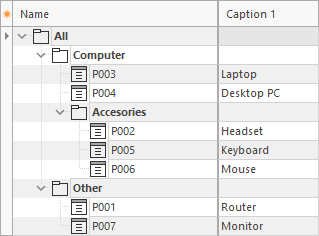
In this example, products are grouped into product types: P001 to P007 are the items of the product dimension; All, Computer, Accessories, and Other are sums (bold).
Sums
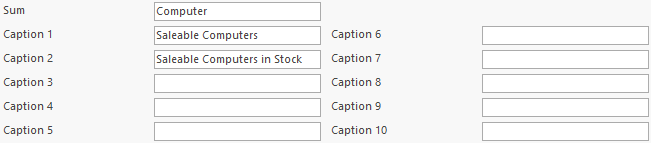
Dimension items are aggregated into sums, which can flow into other sums. Branches of the tree can have different depths, e.g. in balance sheets or income statements. The name of each sum must be unique within the tree. Like dimension items, sums can have up to 10 captions, which do not need to be unique, e.g. short name and long name.
Autobuild
It is possible to automatically assign items to sums by defining a function in the sum.
KPI (Key-Performance-Indicator)
Sums can be used to define KPIs.
Items
A dimension item can be assigned to different sums. This is necessary, for example, if a factor is used.
Factor
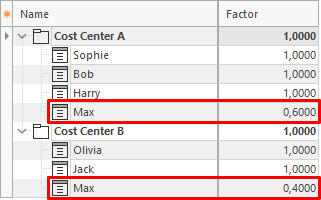
For distribution calculations, items can be added to the tree several times and assigned a factor. This makes it possible, for example, to distribute the costs of an employee to two cost centers. A factor of 1 equals 100%.
In this example, the employee Max works for Cost Center A (factor 0.6 = 60%) and Cost Center B (factor 0.4 = 40%).
Invisible
Items and sums can be made invisible. In this case, they are used for calculation but not displayed. This is useful if, for example, the sum of salaries should be visible but not the salary of every employee.
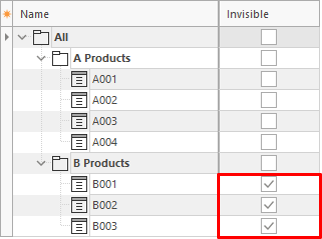
In this example, a query includes the sums All, A Products, and B Products.
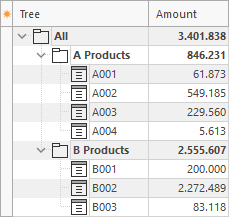
The product items B001, B002, and B003 are made invisible.
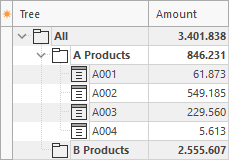
The sum B Products is still calculated correctly, but the assigned items are no longer visible.
Subtrees
For many analyses, it is not necessary to view the entire tree. Subtrees can be defined to display only certain sums or items of a tree. Subtrees are flat extracts of a tree, without hierarchy. The items and sums can be arranged freely. However, totals are always calculated for the entire tree. Any number of subtrees can be created for each tree.
