Appearance
Formulas
Formulas consist of dimension items and sums. Sums use functions that can be used for summing or for KPIs.
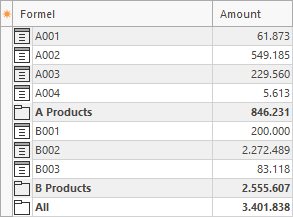
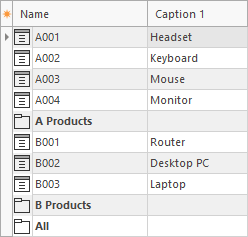
This example contains product items and the sums A Products, B Products, and All (bold).
Sums
Sums use functions. In this example, A Products and B Products sum items. All is the sum of A Products and B Products.
A Products (uses every single item):
Item("A001") + Item("A002") + Item("A003") + Item("A004")B Products (uses an item range):
ItemRange("B001", "B003")All:
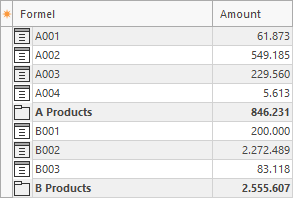
Sum("A Products") + Sum("B Products")Result of a query
Rubrics
It can be time-consuming to specify items and sums in the function. Therefore, rubrics can be used. These are stored in the items and sums.
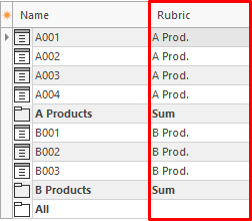
The sums can use rubrics to calculate the summary.
A Products:
Rubric("A Prod.")B Products:
Rubric("B Prod.")All:
RubricRange("A Prod.","B Prod.")Factor
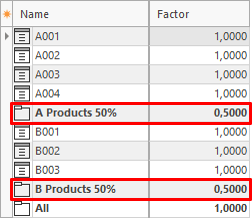
For distribution calculations, items can be added to the tree several times and assigned a factor. This makes it possible, for example, to distribute the costs of an employee to two cost centers. A factor of 1 means 100%.
In this example, the sums A Products and B Products use a factor of 0.5 (50%).
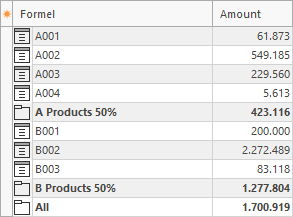
The query calculates the sums with the factor.
Invisible
Items and sums can be made invisible. In this case, they are used for the calculation but not displayed. This is useful if, for example, the sum of salaries should be visible but not the salary of every employee.
The product items B001, B002, and B003 are made invisible.
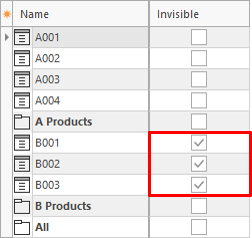
The sum B Products is still calculated correctly, but the assigned items are no longer visible.