Appearance
Scripts
Scripts are used for special requirements where the other methods of automating calculations are not enough. For example, API commands can be started to create initial plan values or to process text files. The scripts are written in a dialect of the Basic or the Pascal programming language.
Name, Captions and Language
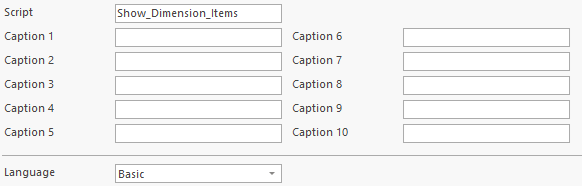
Each script has a unique name inside the database. There are also 10 captions that are not required to be unique. A language must be specified for each script (Basic or Pascal).
Syntax
Syntax description of the languages.
Inputs
When a script runs, it is possible to pass values (inputs).
Default Inputs
There are 50 default double inputs (numbers), DOUBLEINPUT1 .. DOUBLEINPUT50 and there are 50 default string inputs (texts), STRINGINPUT1 .. STRINGINPUT50.
API Example:
RUN SCRIPT
SCRIPT=[Create_Dimension]
DOUBLEINPUT1=123.45
STRINGINPUT1=ProductGroup
The values of the default inputs can be used in the script with GetInput.
Example Basic:
vb
A = GetInput("DoubleInput1")
B = GetInput("StringInput1")
Example Pascal:
pascal
A := GetInput('DoubleInput1');
B := GetInput("StringInput1");
Custom Inputs
It is also possible to uses names for inputs. The entries are differentiated between number (DOUBLEINPUT) and text (STRINGINPUT). The value part contains two paramaters, splitted by a point character. The first parameter contains name of the input and the scond parameter contains the value.
RUN SCRIPT
SCRIPT=[Create_Dimension]
DOUBLEINPUT=[MyNumber].[123.45]
STRINGINPUT=[MyText].[A Text]
The values of the custom inputs can be used in the script with GetInput.
Example Basic:
vb
A = GetInput("MyNumber")
B = GetInput("MyText")
Example Pascal:
pascal
A := GetInput('MyNumber');
B := GetInput("MyText");
Outputs
Outputs are used for the response values of a script. It is a list with fields and records. The output fields are defined in the script. The command AddOutput adds a new record. SetOutput sets a field in the current record.
Example Basic:
vb
' Add an output record
AddOutput

' Set the output fields
SetOutput("NumberField",123.45)
SetOutput("TextField","My Text")
Example Pascal:
pascal
// Add an output record
AddOutput;

// Set the output fields
SetOutput('NumberField',123.45);
SetOutput('TextField','My Text');
Default Commands
Each script contains 20 default command variables (Command1 .. Command20). They are used to define API commands in text format that can be sent to the database. A command has different properties to add the API command text or to run the command.
TODO: !!! Verweis auf Script/Command !!!
Example Basic:
vb
' Clear command text
Command1.Clear

' Set API command
Command1.Add("CREATE DIMENSION")
Command1.Add("DIMENSION=[ProductGroup]")

' Run command
Command1.Run
Example Pascal:
pascal
// Clear command text
Command1.Clear;

// Set API command
Command1.Add('CREATE DIMENSION');
Command1.Add('DIMENSION=[ProductGroup]');

// Run command
Command1.Run;
Default Strings
Each script contains 20 default strings (Strings1 .. Strings20). Strings are text lists. They can be used to load, modify and save text files. A command has different properties. !!! Verweis auf Script/Strings !!!
Example Basic:
vb
' Clear list
Strings1.Clear

' Add lines
Strings1.Add("Product 1")
Strings1.Add("Product 2")
Strings1.Add("Product 3")

' Get line 2, the index is 0 based
A = Strings1.Line[1]
Example Pascal:
pascal
// Clear list
Strings1.Clear;

// Add lines
Strings1.Add('Product 1');
Strings1.Add('Product 2');
Strings1.Add('Product 3');

// Get line 2, the index is 0 based
A := Strings1.Line[1];
Example
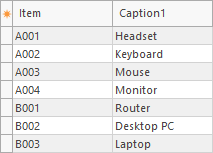
In this example the default command Command1 is used to show the items of a dimension. The name of the dimension is given by a string input parameter. The script has two text output fields Item and Caption1.

Example Basic:
vb
' Declare variables
dim I

' Set the API command, the input "Dimension" contains the dimension name
Command1.Clear
Command1.Add("SHOW ITEMS")
Command1.Add("DIMENSION=[" + GetInput("Dimension") + "]")

' Run the API command and check for errors, maybe an invalid dimension name
if Command1.Run = False then
  ' Add an output record
  AddOutput
  ' Use the field "Item" to show the error. The error text is stored in the output property of the API command
  SetOutput("Item",Command1.Output)
end if

' Loop over the result records of the API command
for I = 0 to Command1.RecordCount - 1
  ' Add an output record
  AddOutput
  ' Set the output values of the current record
  SetOutput("Item",Command1.FieldValue(I,"Item"))
  SetOutput("Caption1",Command1.FieldValue(I,"Caption1"))
next
Example Pascal:
pascal
// Declare variables
var
  I;
begin
  // Set the API command, the input 'Dimension' contains the dimension name
  Command1.Clear;
  Command1.Add('SHOW ITEMS');
  Command1.Add('DIMENSION=[' + GetInput('Dimension') + ']');

  // Run the API command and check for errors, maybe an invalid dimension name
  if Command1.Run = False then
  begin
    // Add an output record
    AddOutput;
    // Use the field 'Item' to show the error. The error text is stored in the output property of the API command
    SetOutput('Item',Command1.Output);
  end;

  // Loop over the result records of the API command
  for I := 0 to Command1.RecordCount - 1 do
  begin
    // Add an output record
    AddOutput;
    // Set the output values of the current record
    SetOutput('Item',Command1.FieldValue(I,'Item'));
    SetOutput('Caption1',Command1.FieldValue(I,'Caption1'));
  end;
end;
The script is excuted with the API command RUN SCRIPT.
RUN SCRIPT
SCRIPT=[Show_Dimension_Items]
STRINGINPUT=[Dimension].[Product]
As result, the items of the given dimension are shown.