
Appearance
Dimensions
Dimensions are the central element in multidimensional databases. They categorize master data, such as products, customers, or regions. Each dimension can be used in multiple tables, and table values (measures) can be summarized across the dimensions.
Name and Captions
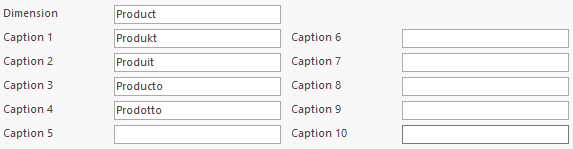
Each dimension has a unique name inside the database. There are also 10 captions, which do not need to be unique. In this example, the unique name of the dimension is Product. Captions 1 to 4 contain the names for Product translated into several languages.
Standard Attributes
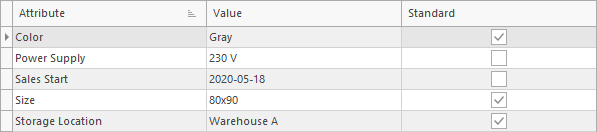
Each dimension consists of a finite set of items, and each item can have any number of individual attributes. Attributes are (name, value) pairs that describe the item in more detail, e.g. color, size, or storage location.
For a dimension, a set of standard attributes can be specified. These are present in all items and can be used to specify required inputs.

In this example, a product has three standard attributes (Color, Size, Storage Location) plus two additional attributes (Power Supply, Sales Start).
Fixed Dimensions
Some dimensions are created automatically in databases. These are the date and time dimensions, which cannot be deleted. Captions can be changed, but items cannot be added or deleted. However, item captions and attributes can be changed.
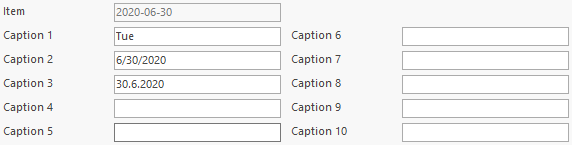
In this example, the item 2020-06-30 of the day dimension is displayed. The item name cannot be changed (grayed out). Captions can be changed. Caption 1 contains the weekday (Tuesday). Caption 2 and 3 contain different date formats.
Conversions
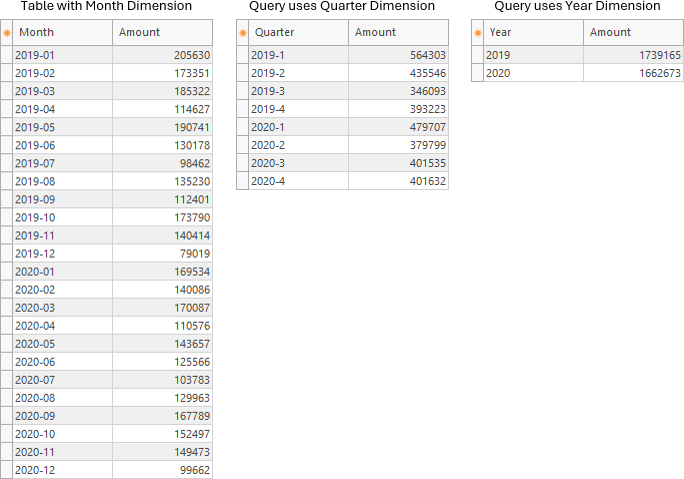
Fixed dimensions are linked to each other. This allows conversion between them, e.g. when querying data. The following table shows how days are linked/converted to months and years.
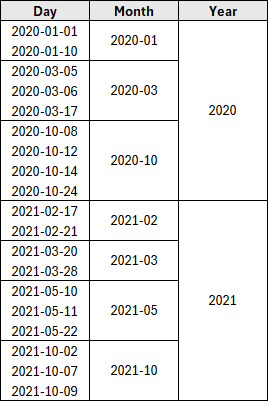
For example, if a table has data with the month dimension and a query uses the quarter or year dimension, the data is automatically aggregated to quarter/year values.
Main and Minor Dimensions
Fixed dimensions are divided into two groups: main and minor.
Main dimensions represent a real date or time, e.g. the Day dimension has an item 2020-06-30, or the Month dimension has an item 2020-06.
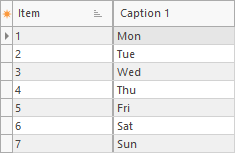
Minor dimensions are conversions of the main dimensions, e.g. the Day item 2020-06-30 is converted to 2 (Tuesday) in the DayOfWeek dimension.
Date/time conversion examples
In this example, the Day item 2020-06-30 is converted into other date dimensions.
| Dimension | Main/Minor | Sample |
|---|---|---|
| Day | Main | 2020-06-30 |
| Week | Main | 2020-27 |
| Month | Main | 2020-06 (Jun) |
| Quarter | Main | 2020-02 (Apr - Jun) |
| HalfYear | Main | 2020-01 (Jan - Jun) |
| Year | Main | 2020 |
| OffsetYear | Main | 2020-2021 |
| DayOfWeek | Minor | 2 (Tue) |
| DayOfMonth | Minor | 30 |
| DayOfYear | Minor | 182 |
| WeekOfYear | Minor | 27 |
| MonthOfYear | Minor | 06 (Jun) |
| QuarterOfYear | Minor | 2 (Apr - Jun) |
| HalfYearOfYear | Minor | 1 (Jan - Jun) |
In this example, the Second item 13:30:15 is converted into other time dimensions.
| Dimension | Main/Minor | Sample |
|---|---|---|
| Second | Main | 13:30:15 |
| Minute | Main | 13:30 |
| Hour | Main | 13 |
| SecondOfMinute | Minor | 15 |
| SecondOfHour | Minor | 1815 |
| MinuteOfHour | Minor | 30 |
| HalfDay | Minor | 2 (PM) |
Offset Year
Some companies have a fiscal year that does not begin in January, but in another month. This offset month (1-12) can be defined when creating the database. It can be changed later in the control file or with the command EDIT DATABASE SETTINGS.
The dimension OffsetYear uses this offset month parameter. This example shows the start and end month of the offset year 2020-2021.
| Offset Month | Start/End of 2020-2021 |
|---|---|
| 1 (no offset) | 2020-01 till 2020-12 |
| 2 | 2020-02 till 2021-01 |
| 3 | 2020-03 till 2021-02 |
| 4 | 2020-04 till 2021-03 |
| 5 | 2020-05 till 2021-04 |
| 6 | 2020-06 till 2021-05 |
| 7 | 2020-07 till 2021-06 |
| 8 | 2020-08 till 2021-07 |
| 9 | 2020-09 till 2021-08 |
| 10 | 2020-10 till 2021-09 |
| 11 | 2020-11 till 2021-10 |
| 12 | 2020-12 till 2021-11 |
Date Range
The main date dimensions (day, week, month, quarter, half year, year, and offset year) all use the year range 1990-2100.