
Appearance
Users
Users are created and saved per database.
Permissions
Permissions can be assigned to the user for different database objects. The type of the database object determines which permissions can be set.
Properties
Each user has several properties that can be edited via the Manager application or set via API commands.
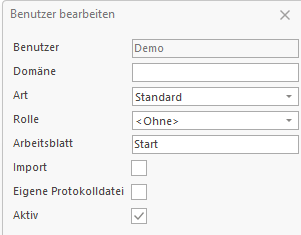
Domain
On a Windows Server, a domain can be defined for users. If a domain is set, no password is required. When a user logs on, the server asks the domain controller to validate the password.
Kind
Each user belongs to one of three kinds of users that have different sets of permissions assigned.
Default
Default users have no permissions by default. Permissions must be set individually or assigned through a role.
Designer
Designers also have no permissions by default. But they are allowed to design reports, for example, in the Studio application.
Admin
Admins have all permissions.
A role can be assigned to a user. If the role has a different kind than the user, the higher kind is used.
| Role Kind | User Kind | Used Kind |
|---|---|---|
| Default | Default | Default (equal) |
| Designer | Default | Designer (from role) |
| Default | Designer | Designer (from user) |
| Default | Admin | Admin (from user) |
Role
A role can be assigned to a user to give the permissions of the role to the user. In addition, individual permissions can be assigned to the user. If a permission is assigned both by the role and directly to the user, the higher permission is used.
In this example, a role is assigned to the user. The role and the user have different permissions for an object, such as a dimension or table.
| Role Permission | User Permission | Used Permission |
|---|---|---|
| None | None | None (equal) |
| Read | None | Read (from role) |
| None | Read | Read (from user) |
| Write | Read | Write (from role) |
| Read | Write | Write (from user) |
Worksheet
A start worksheet can be defined for each user. This is used in different applications, such as the Studio. Since only one worksheet can be assigned, all applications using this parameter must contain the same start worksheets.
Import
Sometimes users need to import data into objects for which they do not have permission, such as dimensions or tables. The Import property can be assigned for this purpose.
Individual Log
Separate log files can be created for specific users. These log files are saved in the log directory of the server. The log file for a user has a specific format:
Log_❮Database❯@❮User❯_YYYY_MM_DD.logActive
Sometimes a user should be deactivated but not deleted. This can happen if the user is absent for a longer period, such as due to illness. An inactive user can no longer log in. The history of a user can be shown.

Admin Users
Each database has two fixed users for administration: Sys and SysTech.
The server sets the passwords for these users at start, they are not saved per database, i.e., all databases on one server use the same passwords for Sys and SysTech.
Sys is a superuser with all privileges.
SysTech can manage databases (such as create, load, or save databases) but cannot access data.
Local Users
Local users can only log in from the IP 127.0.0.1 (IPv4) or ::1 (IPv6). They cannot connect from outside the server. This allows giving them admin permissions and to write the password, for example, in a batch file. Local users are used for automated processes, such as import scripts that run at night.
Local users must begin with the text Local in the username.
Example:
Local_SaveDatabase
Local_Admin
Local_XVZTR
For security reasons, they should still have a secure password.