
Appearance
Installation
This section describes how to install the Taurec server on Linux. Follow these steps to prepare your system and perform the initial setup. Configuration and operation are covered in later sections.
1. Create a Dedicated User
It is recommended to create a separate user for the Taurec database server (e.g. taurec).
2. Prepare the Application Directory
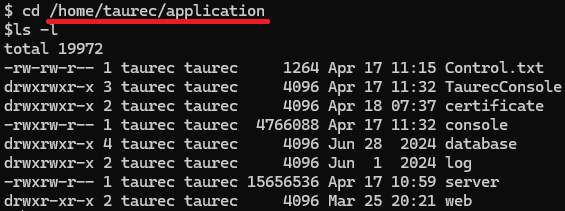
Create an application directory in the home directory of the taurec user. This directory will contain the server application, databases, logs, and related files.
3. Copy Server Binaries
Copy the server and console applications to the Linux system. For example, use scp to transfer files from Windows®.
shell
scp C:\Downloads\Taurec\server taurec@<linux-server-ip>:/home/taurec/application
scp C:\Downloads\Taurec\console taurec@<linux-server-ip>:/home/taurec/application
4. Set Execute Permission
Set execute permission for the server and console binary.
shell
chmod -v u+x server
chmod -v u+x console
5. Enable Web Server Port (Optional)
If you plan to use ports below 1024. For example 80 or 443 for the web server endpoint, grant the necessary capability as root.
shell
sudo setcap CAP_NET_BIND_SERVICE=+eip /home/taurec/application/server6. Start the Server
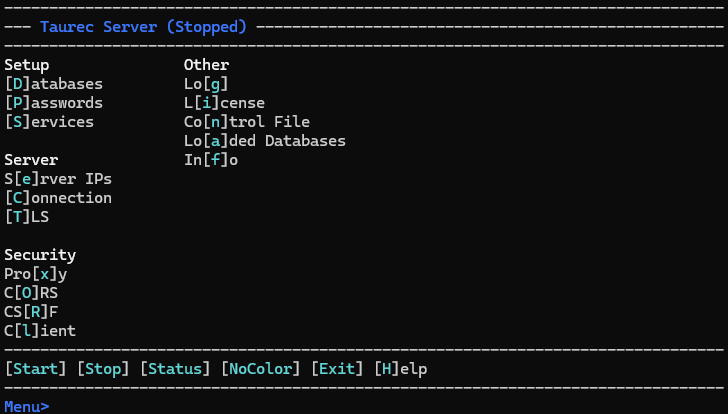
Start the server.
shell
./serverThe server menu should appear.
Next Steps: Configuration
Once the server is installed and started, proceed to Configuration to set up databases, endpoints, security, and other server settings.