Appearance
Autobuild
Items can be automatically assigned to sums by defining a function in the sum. The function checks every item of the dimension and must return a boolean value (true or false). If the return value is true, the item is assigned to the sum.
The autobuild process is started with the BUILD TREE API command. For example, it can be used after an import.
Item Functions
Item functions can be used to get the name, captions, or attribute values of items.
Name
Gets the unique name of the item.
Example:
Name() -> P002Caption1
Gets caption 1 of the item.
Example:
Caption1() -> Desktop PCCaption2
Gets caption 2 of the item.
Example:
Caption2() -> Desktop PC, 128GB, 4TBCaption3
Gets caption 3 of the item.
Caption4
Gets caption 4 of the item.
Caption5
Gets caption 5 of the item.
Caption6
Gets caption 6 of the item.
Caption7
Gets caption 7 of the item.
Caption8
Gets caption 8 of the item.
Caption9
Gets caption 9 of the item.
Caption10
Gets caption 10 of the item.
Attribute
Gets an attribute value of the item.
Examples:
Attribute("Color") -> Green
Attribute("Size") -> 80x90
Attribute("Storage Location") -> Warehouse A
Default Functions
If
Performs a logical test and returns one of the specified values depending on the test result.
Parameters:
| Number | Description |
|---|---|
| 1 | Logical test |
| 2 | True value |
| 3 | False value |
Example:
If(Name()="P001", "Item is P001", "Item is not P001")Pos
Returns the start position of the find text in the text. If the find text is not found, the result is 0.
Parameters:
| Number | Description |
|---|---|
| 1 | Find text |
| 2 | Text |
Example:
Pos("BC","ABCD") -> 2
Pos("CD","ABCD") -> 3
Pos("XY","ABCD") -> 0
StrEnds
Returns True if the text ends with the find text.
Parameters:
| Number | Description |
|---|---|
| 1 | Find text |
| 2 | Text |
Example:
StrEnds("34","1234") -> True
StrEnds("56","1234") -> False
StrEqual
Returns True if text 1 and text 2 are equal.
Parameters:
| Number | Description |
|---|---|
| 1 | Text 1 |
| 2 | Text 2 |
Example:
StrEqual("A","A") -> True
StrEqual("A","B") -> False
StrGreater
Compares two strings. Returns True if the first text is greater.
Parameters:
| Number | Description |
|---|---|
| 1 | Text |
| 2 | Greater text |
Example:
StrGreater("B","A") -> True
StrGreater("B","B") -> False
StrGreater("B","C") -> False
StrGreaterEqual
Compares two strings. Returns True if the first text is greater or equal.
Parameters:
| Number | Description |
|---|---|
| 1 | Text |
| 2 | Greater or equal text |
Example:
StrGreaterEqual("B","A") -> True
StrGreaterEqual("B","B") -> True
StrGreaterEqual("B","C") -> False
StrIn
Returns True if the find text is in the text.
Parameters:
| Number | Description |
|---|---|
| 1 | Find text |
| 2 | Text |
Example:
StrIn("12","1234") -> True
StrIn("23","1234") -> True
StrIn("56","1234") -> False
StrInRange
Returns True if the text is greater or equal to start and less or equal to end.
Parameters:
| Number | Description |
|---|---|
| 1 | Text |
| 2 | Start |
| 3 | End |
Example:
StrInRange("B","A","Z") -> True
StrInRange("D","B","Z") -> True
StrInRange("B","F","Z") -> False
StrLess
Compares two strings. Returns True if the first text is less.
Parameters:
| Number | Description |
|---|---|
| 1 | Text |
| 2 | Less text |
Example:
StrLess("B","A") -> False
StrLess("B","B") -> False
StrLess("B","C") -> True
StrLessEqual
Compares two strings. Returns True if the first text is less or equal.
Parameters:
| Number | Description |
|---|---|
| 1 | Text |
| 2 | Less or equal text |
Example:
StrLessEqual("B","A") -> False
StrLessEqual("B","B") -> True
StrLessEqual("B","C") -> True
StrStarts
Returns True if the text starts with the find text.
Parameters:
| Number | Description |
|---|---|
| 1 | Find text |
| 2 | Text |
Example:
StrStarts("12","1234") -> True
StrStarts("56","1234") -> False
Autobuilder Sort
It is possible to sort the assigned items. For this, the BUILDERSORT property of the sum is used. It is a comma-separated list of Name and Caption1 to Caption10.
Example:
The items are first sorted by caption 1 and then by name.
Caption1,NameExample
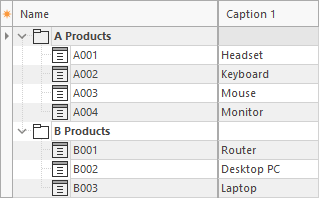
In this example, product items are assigned to sums based on the first letter of the item name.
1. The product items start with an A or B.
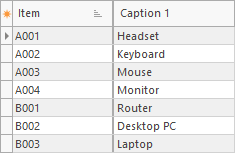
2. There is a tree with two sums.

3. The sums contain the autobuild function.
A Products. Assigns all products where the item name starts with A:
StrStarts("A",Name())B Products. Assigns all products where the item name starts with B:
StrStarts("B",Name())4. After running autobuild, the items are assigned to the sums.