Appearance
KPI (Key-Performance-Indicator)
Tree sums can be used to define KPIs. For this, a function is defined in the KPI. If a KPI refers to items or sums, these must be located before the KPI sum in the tree.
Sum and Item Functions
Item
Gets the value of an item.
Parameters:
| Number | Description |
|---|---|
| 1 | Name of the item |
Example:
Item("P001")ItemRange
Gets the value of an item range.
Parameters:
| Number | Description |
|---|---|
| 1 | Name of the start item |
| 2 | Name of the end item |
Example:
ItemRange("P001","P005")Sum
Gets the value of a sum.
Parameters:
| Number | Description |
|---|---|
| 1 | Name of the sum |
Example:
Sum("A Product")SumRange
Gets the value of a sum range.
Parameters:
| Number | Description |
|---|---|
| 1 | Name of the start sum |
| 2 | Name of the end sum |
Example:
SumRange("A Product","E Product")Field
Returns the name of the database field currently being calculated.
Example:
Field() -> AmountFieldCaption
Returns the caption of the field currently being calculated. The caption in the query can differ from the database field name.
Example:
FieldCaption() -> Sales AmountDefault Functions
If
Performs a logical test and returns one of the specified values depending on the test result.
Parameters:
| Number | Description |
|---|---|
| 1 | Logical test |
| 2 | True value |
| 3 | False value |
Example:
If(Field()="Amount", "Field is Amount", "Field is not Amount")NullDiv
Divides two values. If division by zero occurs, an error value is returned.
Parameters:
| Number | Description |
|---|---|
| 1 | Value 1 |
| 2 | Value 2 |
| 3 | Error value (optional) |
Example:
NullDiv(10,2) -> 5
NullDiv(10,0) -> 0
NullDiv(10,2,9999) -> 5
NullDiv(10,0,9999) -> 9999
NullDiv(Item("P001"),Item("P005"))
Percent
Calculates the percentage of two values.
Parameters:
| Number | Description |
|---|---|
| 1 | Value 1 |
| 2 | Value 2 |
Example:
Percent(15,5) -> 300PercentDeviation
Calculates the percentage deviation of two values.
Parameters:
| Number | Description |
|---|---|
| 1 | Value 1 |
| 2 | Value 2 |
Example:
PercentDeviation(20,30) -> 50
PercentDeviation(10,30) -> 200
Example
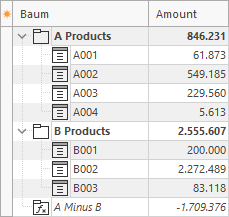
In this example there are A and B products. A KPI is created that subtracts both from each other (A Minus B).
1. A tree contains two sums (A Products and B Products). There is also an empty sum without items (A Minus B).
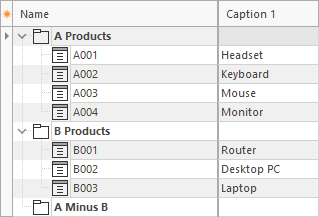
2. The sum A Minus B contains a KPI function.
Sum("A Products") - Sum("B Products")3. When the query runs, the KPI is calculated.