
Appearance
Field Properties
The properties of the selected field can be changed with the inspector on the right.
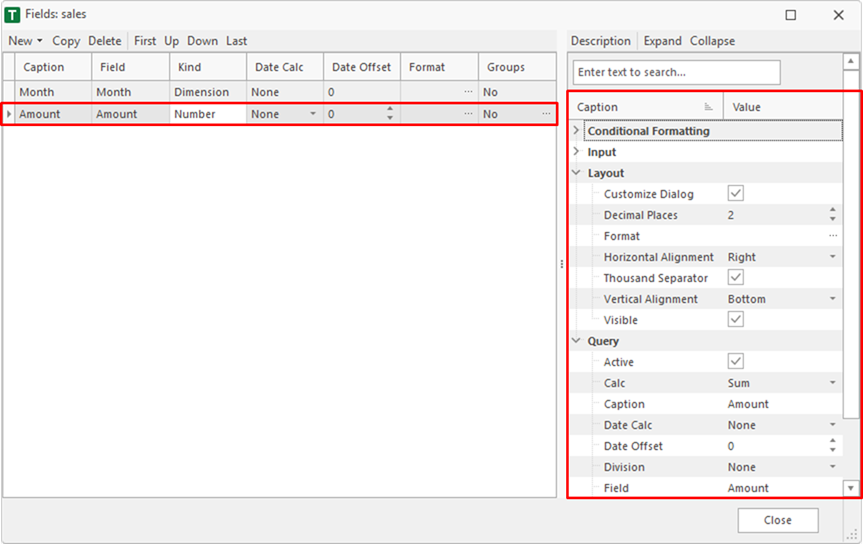
Properties
Conditional Formatting/Fill Color
| Name | Description |
|---|---|
| Color | Default fill color. If black is used, the fill color is inactive. |
| Greater Color | Fill color if the value is greater than the Greater Value. If black is used, the fill color is inactive. |
| Greater Value | Check value for Greater Color. |
| Lower Color | Fill color if the value is greater than the Lower Value. If black is used, the fill color is inactive. |
| Lower Value | Check value for Lower Color. |
Conditional Formatting/Text Color
| Name | Description |
|---|---|
| Color | Default text color. If black is used, the text color is inactive. |
| Greater Color | Text color if the value is greater than the Greater Value. If black is used, the text color is inactive. |
| Greater Value | Check value for Greater Color. |
| Lower Color | Text color if the value is greater than the Lower Value. If black is used, the text color is inactive. |
| Lower Value | Check value for Lower Color. |
Input
| Name | Description |
|---|---|
| Input Color | Fillcolor after input. |
| Input Kind | Kind of the input (record, distribution, target value...). |
| Input Part | Specifies whether values can be entered on records and/or sums. |
| Need All Dimensions | All dimensions of the table must be specified. |
Layout
| Name | Description |
|---|---|
| Customize Dialog | Shows or hides a dimension in the customize dialog. |
| Decimal Places | Decimal places of a number field. |
| Format | Format of the dimension or number field. |
| Horizontal Alignment | Horizontal alignment. |
| Thousand Separator | Thousand separator of a number field. |
| Vertical Alignment | Vertical alignment. |
| Visible | Shows or hides a field. |
Query
| Name | Description |
|---|---|
| Active | Activates or deactivates a dimension. If a dimension is deactivated it is not used in the query. |
| Calc | Calculation kind of the field (sum, min, max...). |
| Caption | Caption that appears in the heading. This can be different from the field name. |
| Date Calc | Date calc of the value (year, year to date...). |
| Date Offset | Moves the date dimension items by the offset. |
| Division | Divides a field value. |
| Field | Name of the field in the table. |
| Groups | Shows the fields groups. This allows e.g. columns to be filtered individually. See also: Field Groups |
| Sort | Sort order of the field in the query. |